Loading...
Loading...
Loading...
Loading...
Loading...
Loading...
Loading...
Loading...
Loading...
Loading...
Loading...
Loading...
Loading...
Loading...
Loading...
Loading...
Loading...
Loading...
Loading...
Loading...
Loading...
Loading...
Loading...
Loading...
Loading...
Loading...
Loading...
Loading...
Loading...
Loading...
Loading...
Loading...
Loading...
Loading...
Loading...
Loading...
Loading...
Loading...
The Ultimate Gaming Paradigm - But Not Without Its Problems.
Gaming has transformed dramatically over the last few decades, driven by technological advancements that redefine player interactions and immersive experiences. Today, three main methods dominate how games are played, each with its own strengths and drawbacks:
Mobile Gaming: Offers easy development and widespread access, but is limited by mobile hardware constraints and the friction of app downloads.
Console/PC Gaming: Delivers premium graphics and high performance, but requires expensive hardware, large game downloads, and lengthy installations.
WebGL Gaming: Provides instant access via web browsers without installation, yet struggles with optimization and performance across different devices.
Each of these models comes with trade-offs, forcing developers to balance accessibility, quality, and cost efficiency. The result is a compromise—no single traditional approach can deliver top-tier visuals and broad accessibility without incurring significant costs or hurdles for players.
Pixel streaming, commonly known as cloud gaming, promises to eliminate these compromises. By running games on powerful remote hardware and streaming the visuals to users, pixel streaming removes hardware barriers completely. In theory, any AAA game can run instantly and seamlessly on any device – from high-end gaming rigs to average smartphones – because the heavy computation happens in the cloud, not on the local device. This approach could usher in a new era of gaming where friction disappears: no installs, no updates, no device incompatibilities.
Our vision is that pixel streaming will soon become the standard across all gaming platforms, delivering high-end experiences with the convenience of a web app. But to understand its impact, we must first explore what makes pixel streaming a game changer, and why current centralized solutions are holding it back.
Pixel streaming is a game changer for interactive content delivery. It enables high-fidelity, low-latency gameplay to be delivered as a stream, much like a YouTube video, but with full interactivity. This has several unique benefits that set it apart from traditional gaming distribution models:
Cross-Device Compatibility: High-quality gameplay is instantly delivered to any device – phone, tablet, PC, or smart TV – without installations or compatibility issues, dramatically increasing accessibility and a game's potential reach
Cross-Channel Integration: Games can be easily embedded into websites, social media feeds (TikTok, Instagram, Facebook), e-commerce sites, or messaging apps, multiplying touchpoints for user engagement. A game could be one click away on a news article or an online store, blurring the line between gaming and other online experiences.
Superior Performance Delivery: Players get console-level or PC-level performance regardless of their local hardware. The gameplay is rendered on powerful servers and streamed to the user, ensuring smooth experiences with high graphics settings and no device overheating. A player can start on a phone, then seamlessly continue on a laptop or smart TV with the same fidelity
This revolutionary approach allows websites, apps, and online platforms to serve sophisticated, interactive content on-demand. Imagine scrolling through a retailer’s site and finding a playable demo of a game or a 3D product preview that you can instantly control. Pixel streaming is reshaping digital strategy for content creators, brands, and game studios alike – turning any web portal into a potential high-end gaming platform.
Beyond gaming, pixel streaming is poised to accelerate the emergence of the Open Metaverse. It enables instant, global delivery of immersive experiences without relying on specialized client hardware. Concepts that once required dedicated apps or powerful PCs – rich 3D virtual worlds, digital twins of real places, virtual real-estate tours, personalized AI-driven characters, interactive training simulations – can all be streamed in real time to the user. In other words, pixel streaming can bring metaverse experiences to life instantly, on whatever device you have in front of you. This greatly lowers the barrier for mainstream audiences to access rich, interactive content.
However, as promising as pixel streaming is, it has historically faced a major bottleneck: the infrastructure behind it. To truly fulfill its potential, the industry must address the way these streams are hosted and delivered. This is where YOM’s approach diverges from the status quo.
A Specialized L1 Blockchain for Edge Gaming.
When a player presses Play, something profound happens: a node wakes up, a GPU spins, packets flow, and value moves, end-to-end settled. And at the center of it all lies the $YOM token, the fuel, the reward, and the fire that keeps burning.
Built on Avalanche, YOM’s custom L1 blockchain is the first network engineered specifically for edge gaming: real-time, high-frequency transactions happening at the physical frontier of compute. Its deflationary economics and session-based settlement layer align short-term rewards with long-term network value through an automated burn mechanism on every game session and transaction.
To make things really clear from the start: the YOM L1 is not a general-purpose blockchain. Rather, it’s a compute coordination engine for a global network of GPUs. Every click, every rendered frame, every stream represents a micro-economy of compute, bandwidth, and reward. Each session begins with a simple action: a player initiates a connection.
Under the hood, the HyperOrch scheduler assigns the optimal node based on latency, capacity, and reputation. The selected node launches the game in a secure environment, the session streams to the player’s screen, and the transaction settles natively on-chain.
Node operators who contribute GPU resources are paid in a regional token (e.g. $yEU, $yCHN) paired against $YOM, which is paired against $USDC. A key feature of the payout mechanism is that rewards are tied to sessions handled rather than blocks validated, and is pegged against USD, with regional tokens and the master token ($YOM) being solely used for regional price setting & differentiation and value accumulation (burning on both master token and regional token). This ensures that the network can operate stable & predictable rewards without relying on the value of its underlying fuel.
Since the payout is based on compute provided to the ecosystem, users cannot stake their tokens for rewards. Rather users can lock $YOM or any regional token to liquidity pools on decentralized exchanges (including our own) in order to farm rewards instead. These activities not only secure the network and facilitate smooth token trading, but also offer participants a passive way to accrue additional rewards.
The token has a strict deflationary structure: no new tokens can ever be minted. Instead, Whenever someone plays a game on the network, a percentage of the network rewards are burned in $YOM (2.5%) and its corresponding regional token (2.5%) from where the node is providing resources. Since every purchase of these tokens directly eliminates a portion of tokens from the market, the float becomes scarcer over time; aligning token holders with continued network usage.
And What Makes Cloud Gaming Scale Instead.
Despite its promise, pixel streaming today remains constrained by centralized infrastructure. Current cloud gaming services typically run on large data centers – massive clusters of GPUs in a few geographic locations. This centralized model introduces several problems:
High Costs and Inefficiency: Data centers are expensive to build and operate. Cloud providers must invest enormous capital in specialized hardware, cooling systems, warehouse-sized facilities, and electricity. These costs translate to high hourly rates for GPU cloud instances (often on the order of $1–2 per hour for high-end GPUs). The infrastructure is also often underutilized outside of peak demand, making it economically inefficient.
Scaling Limitations: Demand for GPU power is exploding (for graphics, AI, robotics, and more), but scaling up data centers is slow and capital-intensive. There are physical limits to how quickly you can add server capacity and expand facilities. Central providers struggle to react quickly to surges in demand, and they tend to over-provision (build for peak usage) which leads to waste the rest of the time.
Distance Constraints: With only a handful of big server hubs, many users are located far from the nearest data center. Distance increases ping. If the server is halfway around the world, even the fastest internet can’t overcome the laws of physics – the result is higher latency and a noticeably laggier experience. Truly low latency gameplay (<30 ms) requires servers to be very close to players, which centralized platforms have difficulty achieving globally.
Environmental Impact: Large data centers consume huge amounts of power and emit significant carbon emissions (both through energy use and the heat they generate). They require continuous cooling and maintenance. The cycle of constantly upgrading and replacing hardware also leads to electronic waste. In short, the centralized cloud model is not very environmentally sustainable.
Ownership and Control: Only a few tech giants own most of the cloud gaming infrastructure. This concentration of control means developers and users are beholden to pricing and policies set by those providers. It also stifles innovation – smaller creators can’t easily build alternatives, and features roll out at the pace of these large companies. Moreover, having to go through centralized servers can introduce points of failure and censorship/approval that are outside the community’s control.
At the same time, a vast amount of computing power is actually available in the world but sits idle. Notably, 50–75% of global GPU capacity remains unused in consumer devices at any given moment. Millions of gaming PCs and consoles in homes have powerful graphics cards that are turned off or running at low load when their owners aren’t playing. This represents an enormous pool of latent hardware potential. If even a fraction of this idle power could be tapped for cloud gaming, it would effectively double or triple the available compute resources for gaming globally. And because this hardware is already bought and paid for by consumers, using it is highly cost-effective – essentially leveraging existing assets instead of building new ones.
In summary, centralized cloud gaming faces a two-sided problem: underutilization on the edges and scarcity (plus high costs) in the center. On one side, we have idle GPUs in homes worldwide. On the other, we have overloaded, pricey data centers that can’t easily meet global demand or low-latency needs. This mismatch suggests a clear solution: move the cloud gaming workloads away from the center and out toward the edge – in other words, decentralize it.
This is where YOM’s cloud gaming network enters the game.
Instead of relying on big data centers, YOM utilizes the untapped GPU power in everyday gaming rigs and PCs around the world. Any owner of a capable PC can become a host (node) in the network, streaming games to others when they’re not using their machine.
This creates a truly serverless pixel streaming model – game sessions are hosted on a distributed network of player-run nodes, rather than in a few giant server farms. There is no “central” data center in this model at all and by extension offers clear advantages over the status quo:
Drastic Cost Reduction: By recycling existing hardware instead of building new data centers, YOM eliminates capital expenditures (no expensive server farms to build or GPUs to purchase) and slashes operating costs. The cost to run a streamed gaming session drops from roughly $1–2 per hour (typical cloud GPU rental) to around $0.10 per hour or less. That’s up to a 95% cost savings, which benefits both developers (lower server bills) and players (lower subscription costs or even free-to-play streaming supported by ads or sponsorships).
Global Reach with Local Performance: A decentralized network can naturally spread out to wherever gamers are. Instead of a few regions served by data centers, thousands of nodes run in homes across many countries. YOM’s network can match a player with a nearby node (often within the same city or region), drastically reducing ping. This delivers ultra-low latency (often under 30 ms) and a responsive experience that feels indistinguishable from playing on a local console. And because there are many nodes, if one fails or slows down, another can take over – providing resilience and reliability through sheer numbers.
Economic & Environmental Empowerment: Decentralization shifts the power (and profit) from large corporations back to individual gamers and hardware owners. Instead of paying cloud giants, developers can pay the community of node operators. Gamers who invest in good PCs can earn passive income by renting out their idle GPU time. This model not only democratizes the cloud – it also significantly reduces environmental impact. We’re using electricity and hardware that have already been produced, rather than continuously building new servers. By some estimates, reusing existing GPUs in this way could cut the carbon footprint of cloud gaming by a wide margin, since we’re maximizing the utility of devices that would otherwise sit idle.
The Foundations of Decentralized Cloud Gaming.
YOM’s architecture is purpose-built for decentralized, high-performance cloud gaming. It combines a custom pixel streaming solution, secure edge computing, and intelligent decentralized orchestration to deliver interactive streaming with near-local responsiveness and reliability.
The platform spans from a proprietary pixel streaming services and developer SDKs to the underlying network of trusted GPU nodes coordinated by an AI-driven scheduler. Together, these components enable any AAA game to be streamed instantly to any device with sub-40 ms latency, high reliability (through rapid failover), and end-to-end security – all at a fraction of the cost of traditional cloud gaming.
YOM deploys its own lightweight pixel-streaming service that runs games on remote consumer-grade GPUs and streams the video feed back to players via WebRTC for minimal latency. Once a session is approved, the gameplay is delivered over a direct peer-to-peer connection between the node and the player’s device.
YOM’s streaming protocol establishes an encrypted video/audio stream and input channel without routing through any central server, minimizing latency by eliminating extra hops. Game audio/video and player input data are end-to-end encrypted, so the content remains private and secure even if it traverses relays or public networks.
During live operations and aAt the end of every gaming session, the node reports telemetry (FPS, 95‑th percentile latency, thermals); if thresholds are exceeded it can dynamically scale down/up concurrent player streams of games, depending on the outcome our scheduler.
Nodes publish signed availability records (location hash, GPU class, live load) to a distributed hash table / on‑chain registry. Clients query the same ledger, pick candidates within a latency radius, then request the node’s latest attestation. If the proof checks out the client proceeds; if not, the node is black‑listed until it re‑establishes trust. This serverless matchmaking eliminates single points of failure and allows the network to scale organically while remaining secure.
On shutdown—or if the boot drive is removed—the OS triggers a rollback routine that asserts a PCIe reset, DMA‑scrubs RAM and VRAM, clears any drive keys, and reboots, ensuring no player data or studio IP persists. Updates follow an atomic A/B scheme: a new signed image is written to the inactive slot and only activated after signature verification and checksum pass, with automatic rollback on failure.
The nodes boot a minimal, read‑only Linux image. On first launch the operating system:
Auto‑detects hardware & installs signed GPU drivers so the discrete card is exposed at full performance (no user intervention required).
Runs a registration module that authenticates the user, measures uplink bandwidth, RTT to regional probes, idle GPU capacity, and temperature; it then publishes this capability vector to the discovery ledger for HyperOrch scheduling.
Provides an isolated execution sandbox that mounts each game image read‑only, passes the GPU through exclusively.
Workload allocation across the YOM network is handled by HyperOrch, YOM’s decentralized orchestration engine.
HyperOrch continuously gathers telemetry from each node – a multi-dimensional “capability vector” including available GPU/CPU capacity, memory, bandwidth, encoder load, thermal headroom, and more. Similarly, each game title is characterized by a resource footprint profile (GPU demand, memory needs, expected bitrate, etc.).
Using these inputs, HyperOrch’s AI-driven scheduler predicts the expected performance (e.g. framerate) for a given game on each candidate node and dynamically matches players to the optimal node in real time. Unlike naive approaches that just pick the nearest server, HyperOrch filters and ranks nodes by multiple criteria (player-to-node latency, hardware suitability for the game, current load, etc.) to find a host that can deliver smooth 60+ FPS and <40 ms ping for that session.
The orchestrator even learns from each session: it updates its model with actual performance outcomes, continuously improving placement decisions over time. This intelligent scheduling maximizes network-wide performance and efficiency – avoiding bad host-game pairings that might lag, fully utilizing available GPU headroom, and reducing costs by optimally balancing the load on community nodes.
In practical terms, HyperOrch’s real-time decision-making ensures each player is connected to a node that will give them a console-quality experience, and it can proactively migrate or redistribute sessions if a better match becomes available.
Instant AAA Gaming on Any Device: No Downloads, No Consoles, At Scale.
In practice, empowering a decentralized cloud gaming network and ecosystem requires a sophisticated technical stack, tokenomics and excellent user experience.
YOM developed an infrastructure protocol comprising several key (patent-pending) innovations to make it secure, efficient, and easy to use for both players and developers. This is described in the next chapter.
From a player’s perspective, YOM works like magic. There’s no download, no client installation, and typically no required login. Players simply click a link and, within seconds, they’re playing a AAA game—rendered remotely and streamed directly to their browser or device. Benefits for players include:
Play instantly, even on low-spec devices.
No upfront costs (free-to-play or ad-supported sessions).
Console-like responsiveness with ultra-low latency (<30 ms).
And this frictionless approach allows studios and publishers to engage wider audiences, increase conversions, and remove traditional barriers such as installs, patches, and hardware limitations.
However from a more technical high level perspective, here’s what really happens when a user hits “Play”:
The player requests to launch a game via a web app, embedded link, or partner platform.
HyperOrch, our AI scheduler, finds the best nearby online and available node based on several criteria.
That node, securely from a NANO device, launches the game and begins streaming the game via WebRTC.
Gameplay is streamed peer-to-peer with <30 ms latency, as if it were running locally.
What keeps YOM balanced is its circular and self-regulating economic and governance structure: players create demand, nodes serve it, publishers fund it, and all stakeholders benefit.
Value ($YOM) flow is governed by a reputation based system (XP), laissez-faire economics (supply-demand), and subsequent protocol-level splits: node operator rewards, platform fees, and deflation (burn). All is metered and priced in on-chain.
Long-term governance and ecosystem evolution is handled by the YOM DAO, a decentralized autonomous organization built around the $YOM token and an XP-based node reputation system. Furthermore node license proceeds go to the YOM DAO, which manages treasury operations, governance, liquidity pools and expansion programs.
Payout of both XP and $YOM are rewarded automatically on a per session and performance basis, and bad actors are penalized without centralized enforcement. This structure ensures that:
High-performing nodes earn more and influence roadmap priorities
Platform upgrades and incentive changes are community-led
This cycle is illustrated below as a flow chart ("YOM Revenue & Incentive Loop"). For a breakdown of the full reward split, burn mechanics, liquidity cycles, and long-term deflationary pressure, visit the section.
Node operators contribute their own hardware to the network using YOM’s easy-to-use, plug-and-play NANO. This secure-boot (SSD) device transforms a standard gaming PC into a trusted, isolated cloud-gaming node in minutes, without any technical hassle.
Operators benefit by:
Earning passive token income by sharing their idle GPU resources
Depending on machine specs, earnings scale between $30–70 per GPU and $350 - $500 per month at moderate (60%) utilization
Participating in a community-driven, decentralized economy where they control their hardware and usage time
Increasing earnings and opportunities via an XP-based reputation system (see )
Node operators enjoy full freedom to join or leave the network, aligning incentives naturally with demand and availability.
YOM offers publishers and game studios a groundbreaking new channel for distributing and monetizing interactive content. By removing traditional infrastructure and hardware barriers, YOM significantly expands potential audiences and lowers distribution costs.
Publishers can:
Deploy AAA-quality games and immersive experiences directly onto websites, apps, and social platforms within minutes using YOM’s simple-to-use SDKs.
Dramatically reduce infrastructure costs from traditional cloud gaming solutions (typically $1–2/hour) down to approximately $0.05/session, translating to ~ 95% cost reduction.
Maintain complete control over monetization strategies, including premium, subscription, ad-supported, or free-to-play options.
Retain 100% of their direct game sales revenues, empowering them with greater financial and creative independence.
By leveraging YOM, publishers unlock new possibilities for digital content distribution, audience growth, and sustainable monetization models.
YOM’s payout model is session-based and usage-driven, aligning incentives with real player activity. This is a key differentiator from many crypto networks that simply act as token farms. Instead, our nodes earn in proportion to the amount of gaming sessions they (can) host. This chapter provides a look at how the nodes function in relationship to rewards earned and how rewards are calculated.
The base reward payout is set $0.05 as it ensure that electricity prices in western Europe and US for the required compute are <20% of the payout. The base payout is set based on the energy efficiency, keeping the 20% as a key ratio to achieve per region.
Tip and functions for mobile development
In the era of multi-device gaming, it's crucial to ensure your game is accessible and optimized for various platforms, including mobile devices and tablets. While YOM uses pixel streaming to deliver high-quality graphics across devices, understanding and adapting to different screen sizes and input methods can greatly enhance the user experience. Why implement responsive design:
Broaden your audience by supporting multiple device types
Ensure consistent gameplay experience across platforms
Optimize UI and controls for touch-based interfaces
To dynamically toggle element visibility in response to stream interaction, you can directly utilize the .toggle-on-yom-{targetId}:
If you want to apply custom css, you can use the data-hook to associate specific UI elements with the stream, allowing for broader layout adjustments when the stream is activated or deactivated:
Create a new stream:
Stream Name: enter a unique name (e.g., firststream)
Build Target: choose your target environment (e.g., Development)
Upload Binaries: drag and drop or click to upload your game binaries.
Choose Network: select your preferred network (e.g. Test Net).
Check your configuration and click on pay + deploy.
Wait until both server and client files are uploaded to the designated zone. Do not refresh or leave the app during the upload process.
Great that you have come this far. Congratulations on deploying your stream. Now, it's time to share it with your fans. Follow the steps below to integrate your stream into your website.
Use your uniquely provided stream ID to integrate your stream into your desired platform.
Create a target div for your stream: Place this div within the desired location in your webpage and replace data-streamurl with your personalized stream url.
That's it! You now have a basic YOM integration. Launch your page to see it in action.
If you encounter issues:
Check your browser console for error messages.
Ensure all required scripts are loaded correctly.
Verify that stream URLs are correct and accessible.
YOM provides optional Unreal Engine, Unity and JS SDKs for easier game development. These SDKs let you incorporate responsive HUD overlays, site widgets that can communicate directly with the stream, and provide custom or branded user onboarding or monetization flows.
For further assistance, contact our team at [email protected].
When the session ends, revenue from the session is split programmatically:
40% goes to the node operator
5% is burned to reduce token supply
55% funds the platform treasury, which covers development, growth, and the liquidity pool
All transactions are tracked and managed via smart contracts on-chain.
After you succesfully setup your NANO, you can multiply your earnings potential by adding node licenses to your setup. The maximum possible number of licenses added to your PC is 8. However, the actual number depends on your bandwidth and your gaming rig performance.
Every NANO starts with 1 license for free. The more powerful your gaming rig, the more licenses you can run. Each license requires about 25 mbps of upload bandwidth. You can check how many licenses you can run here.
From the node management view in the webapp, you can easily assign your acquired node licenses to your NANO. Alternatively you may want to decide to delegate your license to a NaaS provider to earn $YOM without needing to .
You can buy licenses from any supported marketplace or via app.yom.net/node-sales. Store them in the same wallet you connected your NANO to easily upgrade your device with more streaming capacity. Do note; the amount of licenses are in limited supply. To provide healthy healthy conditions for all node operators, we unlock licenses and NANO's to the public as we pass the 60% utilization treshold.
To be created.
<div class="additional-info toggle-on-yom-1">
    Information that should show after a user joins the stream.
</div><div id="yomTarget-1" data-hook="#{somediv}" data-streamurl="${STREAM_URL}"></div>YOM Core supports multiple streams on a single page, enabling rich, interactive webpages that can act as content aggregators.
Create multiple stream containers:
<div id="yomTarget-1" data-streamurl="${STREAM_URL_1}"></div>
<div id="yomTarget-2" data-streamurl="${STREAM_URL_2}"></div>
Add corresponding input fields and launch buttons:
<input type="text" id="yomInput-1" placeholder="Name for Stream 1">
<button id="yomLaunch-1">Start Stream 1</button>

<input type="text" id="yomInput-2" placeholder="Name for Stream 2">
<button id="yomLaunch-2">Start Stream 2</button>
Build widgets for independent streams:
const targetId = '2'; // assuming we want to post to stream 2
postToYOM(targetId, 'AdjustSetting', {settingValue: 'newValue'});Publishers pay node operators for running the sessions. The payment usually starts as a recurring FIAT payment, which gets automatically swapped into a regional tokens, each paired against $YOM and $USDC. Below is the distribution key:
Nodes
A large chunk of the rewards go directly to node operators to incentivize their participation.
Network
Funds allocated to infrastructure improvements, software updates and scaling operations.
Burned
2.5% gets burned in the regional token and 2.5% gets burned in $YOM. This mechanism keeps the token supply deflationary, aligning all stakeholders.
As node operators receive their tokens, some choose to hold to accumulate more XP, become active in the community, or provide liquidity on decentralized exchanges, further fueling the network’s growth and liquidity. Others may convert tokens to cover operational costs.
Games that are poorly optimized or highly graphically intensive consume more processing power. Additionally, streaming at 4K, 60 FPS, or handling popular AAA titles can dramatically increase GPU usage. Rewards can fluctuate anywhere between ~ 40% (mobile games) to ~ 250% of the base payout. As part of our solution, we collect telemetry from every game, which we use to assign a workload difficulty score.
Workload rates vary globally. YOM accounts for regional differences via a number of liquidity pools deployed on its own chain against its main asset $YOM and regional tokens. With Regional tokens you can think of $yEU or $yCHN, each in a burn/mint relationship against $YOM.
The regional tokens will each have a different price point which the market will correct for. Operators in markets with traditionally strong advertising demand (e.g., North America, Western Europe) can expect to receive proportionally higher regional token price. Whilst, operators in markets with high operating costs (electricity or ISP/bandwith costs) are expected to receive proportionally higher utilization levels (less competing operators active).
As we discussed earlier the base payout is a function of electricity consumption. Over time, with price differentiation implemented and the expectation of higher payouts in high electricity regions, this will allow us to further optimize the base payout rewards.
Let's zoom out for a bit. The reward formula becomes:
or simpler with some of these variables filled in;
The buy pressure of the session payout, still priced in dollars, is then via smart contract in real-time settled in the regional token using the price peg of $YOM to $USDC. In this smart contract call we burn 2.5% in $YOM and 2.5% in the regional token. This ensures that $YOM globally participates in all usage, whereas the regions participate in their regional contribution to their network.
In simpler terms, 1) your node earns more for harder work and 2) are normalized depending on where you live. This ensures fair market-set pricing for operators and publishers alike.
Session Payout = Base Payout [$] * Distribution Key [%] * Workload Difficulty [%] $0.02 = $0.05 * 40% * 100% Improve accessibility for players with different device preferences
YOM provides a built-in method to identify if a player is connecting from a mobile device:
Access the YomGameInstanceSubsystem in your Blueprint or C++ code.
Check the "GetIsMobile" boolean.
Once you've detected a mobile device, you can make appropriate adjustments :
Increase button sizes for touch input
Implement different widget blueprints for mobile and desktop
Utilize Size Boxes and Scale Boxes for flexible layouts
Use anchors and alignment for position-independent layouts
Simplify certain menus for smaller screens
Implement touch-friendly controls
To debug and test your mobile layout:
Open your game in Chrome
Press F12 to open Developer Tools
Click the "Toggle device toolbar" icon or press Ctrl+Shift+M
Select different device presets or set custom dimensions
Test your game's responsiveness in real-time
By implementing these responsive design techniques, your YOM-powered game will provide a smooth, adaptable experience across a wide range of devices, from high-end desktop computers to smartphones and tablets.
Note: Always test your responsive design on actual devices when possible, as emulators may not perfectly replicate real-world conditions.
Our Plug-and-Play NANO is a node runner that offers a straightforward way to self-host a node, combining the benefits of full control with an easy setup process. With this option, you can quickly deploy your node without dealing with complex software installations.
To run the NANO efficiently, your gaming rig must meet the following minimum hardware requirements:
Minimal System Requirements:
GPU: Any NVIDIA RTX config (2060RTX and higher) with high VRAM to maximize node capacity.
CPU: Intel i5/i7 or AMD Ryzen 7/9 for better multitasking and stability.
RAM: 16GB would be sufficient on low config setups, but 32GB+ is recommended.
Internet: Wired Ethernet connection (min 25mbps upload).
Cooling System: Proper airflow and cooling solutions to prevent overheating.
You can run our to understand your system's eligibility.
Once you’ve confirmed your system meets the requirements, you can order the NANO at our partner for $349 (indicative price; regional taxes may apply) .
Once your device arrives, follow these simple steps to get it up and running:
Connect the NANO to Your PC.
Boot from the NANO.
Restart your PC and access the BIOS by pressing F2, F12, or DEL during startup.
That's it and you are now ready to rock & roll!
This guide introduces best practices for deploying on YOM, and optionally integrating the YOM SDK with your game and providing enabling seamless connection between your stream and web technologies.
Here is an overview of the key benefits to you as a developer:
Rapid Game Deployment
Iterate core AAA+ experiences, not menus.
Target large audiences via device-agnostic compatibility.
Unlimited time pixel-streaming; only pay a small amount per session.
Publish Cross-Channel
Integrate custom web widget support for enhanced interactivity.
Integrate URLs, apps, social media, custom channels and your own branded store front.
Integrate Everything
Seamlessly integrate external data sources & events.
Native tag manager integration for analytics.
Trigger realtime in-game events via god-mode.
Our core thesis is that developing for cloud gaming differs from traditional projects. Each game stream exists on a webpage, app or other medium and is instantly accessible from any device.
While YOM offers a lot of benefits right out of the box, to truly make maximum use of this paradigm, we recommend you to do consider some changes to your way of working.
Since games will be available to your users instantly, you may want to skip bypass main menus and replace desktop HUDs in favor of responsive, instant game design. Hence, this new methodology requires considering:
Designing with "responsiveness" and "instant gameplay" in mind.
Debugging with web servers rather than just in UE5 viewports.
Web widgets and/or bi-directional game-to-web communication.
We lets publishers embed live YOM game streams in any context via two approaches:
The YOM SDK allows creators to design their own counters. This guide will explain how to create and use your own counters with our ecosystem.
To use the features of the counter, it needs to be added to the world first.
YOM Counter is an actor and needs to be manually added to the world to start working. To add the actor, you will have to slide the actor from Content Browser under Plugins -> YOM Content -> Counter into your world.
After this, you can call counter functions through blueprints without errors.
To use the auto replicating feature of the counter (updating a counter value is shared with other clients), you will need to add the counter component to the player blueprint. You can do this by going to your MetaspacePlayer and using the add button on the top left corner of the screen.
After you do this, you can define what to do when a counter value is updated. This is done by using a callback event. This callback event gives you the name of the counter which is updated and its new value.
When a counter value is updated with GetCounterPlayer blueprint function, this callback function will be called on all of the clients with a counter component. Returned value and the name can be used however you like.
From the blueprint actions box (it is automatically open or you should right click to the screen), search for Yom Counter in order to see the available functions.
Example use case for Get Counter function
In this example, we are trying to get testCounter in the current metaspace. Counter value is returned by a callback therefore we drag and drop P Callback node and create a custom event. P value returned by the event is the value of the counter which can be used however the user wants. In this example case it is printed to development screen.
Example use case for Add to Counter function
In this example, counter is set to increment the testCounter in the current metaspace by value 1. Therefore, this will increment that counter value by 1. P Callback function is the function which is returned after API Request is done. It can be used to execute more commands when your increment/decrement request is done.
If callback function is not required, a dummy callback function can be created as it can be seen from the image.
Finally, we can use Get Counter Player blueprint function in order to replicate the get request of the counter value. When it is called from a client, it makes a server call which is replicated to other clients as well. This way, all of the connected clients are getting the new value of the counter as well as the name of the counter.
Example use case for Get Counter Player function
Note: we recommend not updating the counter too much, but 'batch' the counts, as everytime the counter is updated it needs to be updated on the blockchain, which costs money.
If you don't own a gaming PC or don't want to use it for the network, you can also delegate your Node License to our NaaS partners. In fact, delegating your node to a Node-as-a-Service (NaaS) provider is the easiest and most convenient way to participate in the YOM network and earn passive income.
With delegation, you don't need to worry about your setup, monitoring, and maintenance. Instead, a trusted NaaS provider takes care of everything while you enjoy consistent earnings from your node.
You pay a monthly fee to pay a NaaS service to host for you. In return you receive $YOM tokens for you value add to the network. Do note the number of tokens you received is entirely dependent on the performance of the NaaS service. Hence, while its the easiest to get started, it's not risk free. Many of our NaaS partners will attempt to deploy resources in area's with high demand. Others will not. Also their pricing varies. This is healthy competition.
After obtaining your Node License, follow these steps to delegate your node to a NaaS provider and start earning:
Navigate to and connect your Web3 wallet that holds the Node NFT.
Navigate to the Node Management Section:
In the dashboard, find the "Node Management" tab.
Select the node license you wish to delegate.
Once your node is successfully delegated, you can monitor its performance through the YOM dashboard. It works in a similar fashion as the dashboard, however with access to limited views. With delegation you can expect rewards that are usually somewhat higher than running on a NANO, however with the disadvantage that you have to pay a monthly fee in USDC.
Similar to the NANO, payouts are processed automatically at the end of each session and can be claimed directly from your Web3 wallet. Take into consideration; earnings vary based on: the overall demand for cloud gaming sessions; regional network saturation and available workload; your accumulated XP score, which influences workload priority.
Why does YOM use NaaS partners? YOM makes use of NaaS partners on top of our DePIN to add a level of flexibility / scaling in our network, which only data centers can cater to. It ensures that we have more machines available in regions where we need to cater to high peak loads.
Can I switch to self-hosting later if I change my mind? Yes, you can revoke delegation at any time and transition to self-hosting if you prefer a more hands-on approach.
What happens if my NaaS provider underperforms? If your provider fails to meet uptime and performance standards and the amount of $YOM earned is beneath expectations, we recommend re-delegate your node to another provider or use the license for a self-hosting setup.
The YOM SDK allows you to create and listen for your own custom events, allowing communication between the Unreal client and the pixel streamer /web browser. This guide explains how to set up and use them.
You get register an stream event by getting the YomGameInstanceSubsystem:
Set Event Name:
Name of the function to call
Will be displayed in the "GodMode" modal when enabled
Used to call the linked event
Set Event:
Event to be called when the function named FunctionName is triggered
Set NeedsGodMode:
Determines if the event is added to GodMode
Use for admin-only functions (GodMode requires a password)
Create the event:
Drag from Event and search for "create event"
Select "Create Event" node
Choose "select a function" and pick from the dropdown or create a new one
Set stream event data
When you have variables that need to be passed in your function you can already define what names they have so it will show up in the godmode.
You need to create a array and add the amount of variables you have to that.
Param Name: name of the param variable.
Note: The function input will be a Va Rest Json object, allowing data to be sent with the event.
To process data that is sent with the event:
Access the data object passed to the function
Use "get field by name and type" to retrieve specific variables
Implement your logic using the retrieved data
Note that everything we send will be a string and you need to convert that to the type you need.
Post-authentication, the embedded stream loads as an iFrame, spawning the player and hiding certain components. The stream automatically scales across aspect ratios while maintaining resolution quality. Test this in the reference implementation by resizing horizontally (desktop) or vertically (mobile).
To accommodate limited user attention, especially for web-based streams, we utilize a simple, customizable modal that loads post-launching/spawning and its visibility can be managed via the SDK. This allows focus on game development while minimizing overhead and time spent on UI.
The modal includes a "God-mode" option, accessible via a password in the login field. This feature enables real-time in-game event execution without building web components, facilitating testing and script execution. God-mode benefits both developers and moderators, enabling efficient game management and testing.
The YOM SDK allows you to push your own custom events to the browser, allowing communication between the Unreal client and the pixel streamer /web browser. This guide explains how to set up, determine their event scope, and use them.
Once you have the YOMGameInstanceSubsystem, use the PushYomEvent function:
YOMGameInstanceSubsystem->PushYomEvent(PEventScope, PFunction, PVariableNames, PVariableValues);Use the "PushYomEvent" function with these parameters:
Function: Name of the function to call
Variable Names: Array of variable names
Variable Values: Array of variable values
DataLayer: Boolean to determine whether the event should be , used by marketing and data services Google Analytics.
By following these steps, you can push communication from your Unreal Engine project to the pixelstreamer/web browser.
With YOM you can build custom web widgets that communicate directly with the stream via the postToYOM function:
postToYOM('AdjustSetting', {settingValue: 'newValue'});This function facilitates sending commands or adjustments to the stream. Do ensure you register events inside of your game project, to bind the events to certain functions.
We assume you have 3 buttons on your webpage (#spawnBot, #removeBot, #clearBot). On click we can trigger content within the stream using the postToYOM function:
Using YOM SDK you can push events from the game to the web browser. From there you can connect your own logic to it.
YOM SDK can events to the data layer for GTM and GA integration. Configure your GTM to capture these events for detailed interaction tracking.
YOM is active on different types of social media platforms.
You will find different types of content and communities throughout our social channels. We invite you to join us in the conversation about Your Open Metaverse, the Metaverse itself, and related topics.
🔹 Discord
🔹 YouTube
🔹 Medium
🔹 Tiktok
🔹
🔹
🔹
The integration SDK includes a simple Node.js web server referencing a sample HTML + JS implementation. When launching a stream via the YOM Toolbar in UE5, you can optionally start your preferred web server, allowing local debugging of the entire user journey.
We provide a JS library that enables integration and full customization of the stream experience, from authentication to deployment and execution. We provide functionalities like callbacks and multi-stream capabilities for effective control over stream and authentication processes.
Understanding how the network handles workload is crucial, because it directly affects your earnings. Some of the factors are set such as the market you participate in. E.g. the payout in the US than the payout in Bangladesh. However other factors, are completely in your control.
This guide is to optimize exactly that.
The easiest way to increase your total total earnings is to increase maximum potential of your host. To do this, add additional as your hardware comfortably allows, maximizing GPU usage and total earnings.
The Backbone of the Network.
In the YOM ecosystem, nodes are the backbone of a distributed cloud gaming platform. Unlike traditional crypto “nodes” that often sit idle or rely on speculative token emissions, our nodes perform real work, streaming live 3D game sessions to users, and get paid based on actual usage.
A node is essentially a container inside of a gaming computer or server dedicated to running a cloud gaming session for a player. When a player launches a game through YOM’s platform, the game is actually rendered on a node operator’s hardware and streamed to the player’s device in real-time. Each node in the network can stream a gaming session to a single concurrent player.
In simpler terms, running a YOM node is akin to hosting a small game server that one player connects to for a session, except the player only sees the video feed. Because YOM is decentralized, these nodes can be run by everyday operators on their own hardware. Every time content is streamed or rendered by your node, you get paid for that session.
You can define your own custom functions to validate user input on button click. To achieve this add data-callback="{someFunction}" to the launch button. Then define your custom function in a JS file that accepts two parameters: onSuccess, onFailure.
We have as an example the following HTML elements:
In the following example function we perform simple front-end validation to match the data-callback="validatePassword"attribute defined in the yomLaunch-1
Anyone can run a node, provided they obtain a node license and/or have access to suitable hardware or cloud infrastructure. A Node License is essentially an access token that gives you the right to stream more nodes from your host pc or the right to delegate it to other host. Every NANO Node Runner comes with a free embedded license by default. Subsequent licenses are digital NFTs. Once you have such a license, you can choose how to deploy your node: either assign it to your own PC/rig or delegate it to a verified Node-as-a-Service provider who runs the node on your behalf.
Restrictions on the emmission of devices and NFTs allow the protocol to scale with the demand of the ecosystem. In practice that means we emit new Node Runners and Node Licenses to the market as we scale beyond the 60% utilization treshold.
Notably, one physical machine can run multiple nodes (consuming multiple licenses) in parallel if it has enough resources and bandwidth available. YOM’s software modularizes nodes as containers or processes, each serving a different gamer. For example, a powerful GPU like an NVIDIA RTX 4080 can host about 5 concurrent game sessions by running 1 NANO Node Runner + 4 Node Licenses simultaneously on the same rig.
This means an operator with a high-end system can multiply their earnings by supporting several players at the same time using a single machine (essentially slicing their GPU/CPU into virtual machines to create multiple nodes).
The reputation of a node is defined by various factors and is represented by a soul-bound (non-tradeable) metric called XP. The more XP a node operator acquired, the higher their position on the operator leaderboard. The higher your position on the leaderboard the more workload gets assigned to your node, meaning the higher your node utilization rate. Additionally high XP can also translate into winning prizes, badges, perks or bonus multipliers for node earnings. Core earning avenues are:
Network Operation. Node owners who run stable, high-uptime machines accumulate XP in proportion to the reliability and performance of their nodes. This ensures that those contributing critical infrastructure earn corresponding reputation points. And as a bonus simply by holding your rewards in your wallet, your nodes can accrue more XP.
Community Participation. Active Discord or forum participation, creation of high-quality guides or tutorials, and social media advocacy all generate XP. This mechanism rewards both the technical and cultural contributors who help grow and educate the community. The Web App and Discord facilitate easy access for members to participate in activities where they can earn XP.
Community Jobs: Periodic events hosted by the YOM Foundation or community-driven committees can offer bonus XP for tasks like stress-testing new features or helping onboard new members. Certain XP awards are distributed through peer recognition, where outstanding contributions or helpful community moderation receive upvotes or endorsements from other members.
Right-click in the Content Browser
Select "Blueprint Class"
Search for "Yom_BP_ThirdPersonCharacter" to use YOM's existing character framework
Assign the Player Character:
After creating your blueprint, assign it as the player character for your project
Yom_BP_ThirdPersonCharacter includes:
Movement controls (WASD keys)
Interaction system (E key, requires BP_Interact interface)
Camera movement (third-person and first-person)
Camera switching (Q key)
Crouching (C key)
Jumping (Spacebar)
Walking/Running toggle (Left Shift)
Touch support for mobile devices
Customizable settings (walk/run speed, starting view)
To customize Yom_BP_ThirdPersonCharacter:
Override the function you want to change
To add functionality:
Call the parent function
Add your custom logic
To remove functionality:
Override the function
Leave it empty
Do not call the parent function
Note: Overriding preserves changes during SDK updates
Default controls use Unreal's Enhanced Input System and are mapped to a controls customization modal that end-users can alter from within the stream:
To modify:
Create your own "InputMappingContext" in the content folder
Add required defaults
Create new key mappings for your project
Caution: Direct changes to default controls may be overwritten by SDK updates
Following these steps allows you to create, customize, and manage your player character while leveraging YOM's existing functionality and maintaining compatibility with future updates.
One-off landing pages, quick demos
Instant. Copy-and-paste <iframe>
Full-fledged portals, dynamic controls
Script-based API + UI state manager
Set the YOM SSD as the primary boot device.
Save and exit the BIOS settings to continue.
Follow On-Screen Setup Instructions:
Once the system boots into the YOM Node OS, follow the guided setup to claim the device inside of your wallet.
After its connected you can access the system from the web portal by logging in with the wallet you provided.
Choose a NaaS Provider:
Browse through the list of available Node-as-a-Service providers.
Evaluate providers based on their uptime guarantees, historical performance, and service fees.
Confirm Delegation:
Click the “Delegate” button and confirm the transaction in your Web3 wallet.
Once confirmed, your node will be handed over to the NaaS provider for management.
Are there any fees associated with delegation? Yes, NaaS providers charge a fee for the compute your rent from them. You pay this on a per month basis. Be sure to check provider details before delegation.
How secure is the delegation process? The delegation process is secured entirely on-chain, ensuring transparency and immutability. Your Node license remains safely stored in your wallet.


document.addEventListener('DOMContentLoaded', function() {
    document.getElementById('spawnBot').addEventListener('click', function() {
        postToYOM('SpawnBot', {amount: '1'});
    });

    document.getElementById('removeBot').addEventListener('click', function() {
        postToYOM('RemoveBot', {amount: '1'});
    });

    document.getElementById('clearBot').addEventListener('click', function() {
        postToYOM('ClearBot', {});
    });
});<input type="text" id="yomInput" placeholder="your name" autofocus>
<input type="password" id="password" placeholder="Enter password">
<button type="submit" data-callback="validatePassword" id="yomLaunch-1">start the experience</button>function validatePassword(onSuccess, onFailure) {
const passwordInput = document.getElementById('password');
const enteredPassword = passwordInput.value;
const hardcodedPassword = 'secure123'; // This is the hardcoded password
if (enteredPassword === hardcodedPassword) {
onSuccess(); // Call the success callback if the password is correct
} else {
onFailure(); // Call the failure callback if the password is incorrect
}
}Default Value: the value it needs to have or has at the start.


Then you may also want to optimize your utilization rate of your nodes. The utilization rate is determined by your accumulated reputation (XP), which can be increased high uptime, reliable connectivity and community participation. Participate in community events and hold earned tokens to boost your node's reputation, placing you at the front of the line for session allocation.
The other nudge you can tweak is having your pc operate during times or days when there is high demand. Usually high gaming demand peaks evenings and weekends. Ensuring your node is available during these periods increases your likelihood of receiving session assignments.
Finally, prevent abrupt disconnects. Utilize reliable hardware, power backups, and monitoring tools to maintain consistent availability. If you go under once, that's acceptable. However, if that happens repeatedly, your host will get penalized when under a certain uptime rate.
Apart from the above factors, YOM’s orchestrator also performs some balancing to prevent any single node from hogging all jobs or remaining completely idle for too long.
You can further optimize your rewards by ensuring the right balance of assigning your Node Licenses to your own host machine vs. delegating them to external providers.
Technical Knowledge
None
Minimal
Setup Time
Very Low
Moderate
Optimization Potential
Can be optimized by picking the right NaaS.
Can be optimized by building your reputation.
Hardware
None
Gaming PC
One of the most common questions potential node operators ask is “How much can I earn?”. YOM provides a realistic forecast by modeling node earnings as a Gaussian (bell curve) distribution centered around an expected average.
The assumption is that on average, a node will be utilized about 50% of the time it’s available. In other words, roughly half the hours your node is up, it will be actively streaming a session (the other half it might be idle, waiting for demand). Based on network simulations under current conditions, YOM estimates a monthly earnings of $53 per node (assuming 50% workload allocation).
It’s worth noting that these numbers scale linearly with the number of additional node licenses you run on your hardware (assuming your machine can handle it). For example, if you operate a rig with 1 NANO + 4 additional licenses concurrently (e.g. a high-end GPU running five game streams), your projected earnings would be abou.t five times the single-node values. Concretely, five nodes could yield around $265 per month on average.
$679,645
TGE FDV
$25,000,000
Ecosystem (22.5%, 5% unlocked, 24 months linear lockup). This pool is reserved for node operators to support their idle node time via a flat payout rate. This pool gets replenished with 10% of continuous node rewards. All transactions from this pool are programmatic and on-chain and serve as a buffer for getting to global coverage.
OPEX (37.5%, 0% unlocked, 36 months linear lockup). The treasury involves all other non-programmatic transactions that have the mission to stimulate adoption towards decentralized cloud compute. This involves payments to get onto exchanges, provide grants to onboard game studios and pay for expenses that bolster YOM’s non-profit mission. This includes a total grant pool allocated to the team, advisors and OPEX expenses.
Community (27.5%, 2% unlock & 12 months linear lockup). This pool is the transfer for our OG holder community who decided to never sell (12 months linear) and bridge. The tokens that didn't vest/bridge, got burned
Public Round (2%, 25% unlock & 4 months linear lockup). We aim to reserve a small fraction of our supply to cover the marketing costs we spent around the TGE and node rollout.
Strategic Round (5%, 10% unlock & 12 months linear lockup). Reserved for key partners and long-term investors who strengthen YOM’s ecosystem and market presence.
Liquidity pool (6%, 10% unlock & 24 months linear lockup). The token remainder is reserved for and added to liquidity pools to facilitate trading on DEXs and exchanges.
Total tokens
250,000,000
Home Chain
Avalanche (C-Chain / YOM L1)
Trading Chains (via LayerZero)
Base, Binance Smart Chain, peaq, Solana, Somnia, Avalanche C-Chain
TGE Price
0.1000
Initial market cap
$820,640
Initial market cap (excl. locked liquidity)
The YOM SDK allows creators to design their own portals. This guide will explain how to create and use your own portals with our ecosystem. If you just want to use our default portals, you can use the portals in the Content Browser under Plugins -> YOM Content -> Portals and skip to step 2. The portals that you can use are the YomDefaultPortal and the YomFXPortal, where the YomFXPortal is more visually appealing. Note that you must have the option Allow teleporting set to true, you can verify this by going into your MetaspacePlayer and checking if it has a YomPortallingComponent.
To create a custom portal you will have to create a new blueprint asset. Right-click in a folder in the Content Browser and under Create Basic Asset click on Blueprint Class.
This will open op the blueprint dialog box in which you can search for YomPortal. Once you find the YomPortal class select it.
You can now start to customize the portal in every way you like. If you want the plugin to automatically set the material you must set Details -> Auto Set Portal Material to true and the portal must have a StaticMeshComponent called PortalDisplay, this will automatically edit the material of the StaticMeshComponent at runtime when you connect to a different stream. If you want to set the material yourself you can use the Get Portal Material node in the Event On Portal Open and Event On Portal Close events. Furthermore the portal will need a Collision component for triggering the portal behaviour and you can set a default material under Details -> Materials for when the portal is not connected.
You can now add the newly created portal to your level by taking it from the Content Browser and sliding it into your level.
In this step we will describe how to create your own button, if you want to use a default button created by YOM please use the YomDefaultPortalButton, which works by pressing E in front of the button and go to step 4.
To create your own button we will have to create a blueprint. Right-click in a folder in the Content Browser and under Create Basic Asset click on Blueprint Class.
This will open op the blueprint dialog box, in this box click on Actor.
Open up the blueprint and add a collision (we use Box Collision).
Click on the new collision component and under Details -> Events click on the + sign on the On Component Begin Overlap.
This will now open the event graph. Under Variables press the + sign and add the following two variables:
Note that you will have to set the types of the variables yourself, and that the 'eye' needs to be open.
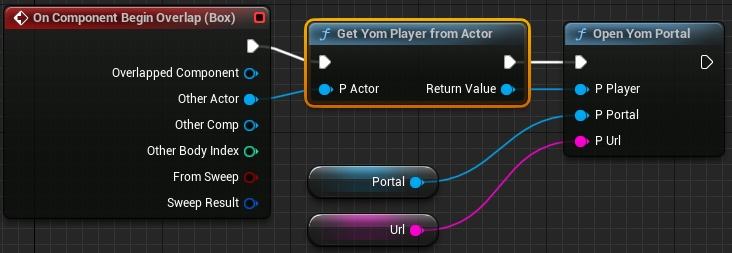
After this setup your graph like this:
You have now created a button that can open a portal when a player runs into the box.
You can now add the newly created button to your level by taking it from the Content Browser and sliding it into your level.
In the Outliner find the button that you just put into your level. In the Details panel of this actor you can now find the Portal and Url variables that you created. In the portal set the portal that you added to the level in step 2. The url of the portal should be a valid url to another stream.
If you start the game now, trigger the button and walk over to your portal you will see the image of your stream in the portal. Furthermore, a directory called PortalImages is added to your project root in which the images are stored. These are needed when submitting your project to YOM as these will be used to display your stream in other streams. When your level is hosted the image of another stream will be set in here.
To create exclusivity and restrict access to experiences based on specific item ownership in YOM, you can follow these steps:
By default, the Gated Access component (YomGatedAccess) should already be connected to your Metaspace Player. If you don't see it as a component, you'll need to add it manually.
To add the component, click on the "Add Component" button in the blueprint editor and search for "Yom Gated Access." Add it to your Metaspace Player blueprint.
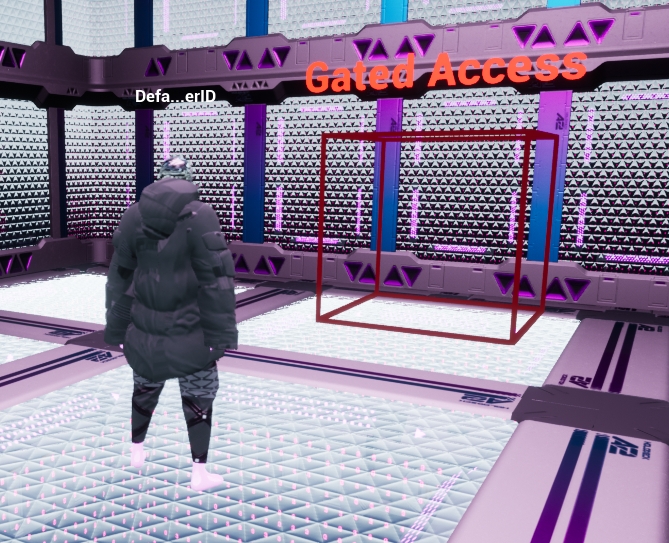
To implement the Gated Access functionality, search for "Yom Gated Access" in the Place Actors window and drag it into the level where you want to create the restricted zone.
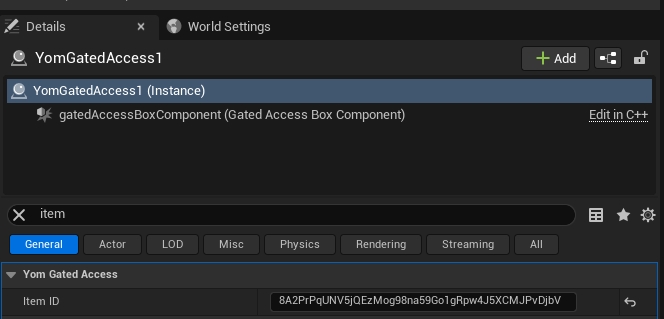
Click on the Gated Access actor in the level.
Look for the "Item ID" property and insert the NFT address or master ID of the NFT item that is required for access. Note that you have separate IDs for devnet and mainnet.
Set up a collision object channel for the Gated Access to work properly.
Go to Project Settings and navigate to the Collision section.
Click on the "New Object Channel" button.
Name the channel as "GatedAccess" and set the default response to "Overlap."
Notes:
You can check if a player has access to the Gated Access zone by calling the blueprint function "Can Player Access."
Make sure the inventory is enabled for the player for this functionality to work.
The user's wallet needs to be fetched before they can go through the Gated Access.
The YOM SDK allows creators to design their own nameplates. This guide will explain how to create and use your own nameplates with our ecosystem. If you just want to use our default nameplates, but it has not been enabled yet on your character you can move to Step 2 and use the YomDefaultNameplateWidget as your widget.
To create a custom nameplate you will have to create a new blueprint asset. Right-click in a folder in the Content Browser and under Create Basic Asset click on Blueprint Class.
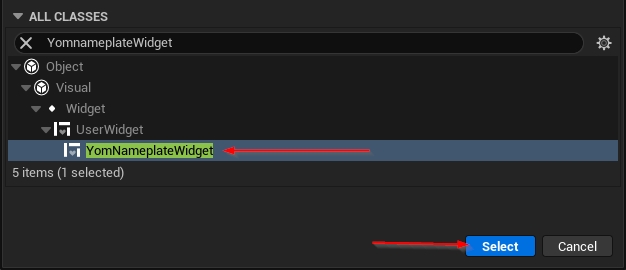
This will open up the blueprint dialog box in which you can search for YomNameplateWidget. Once you find the YomNameplateWidget select it.
You can now customize your nameplate as you like, but one of the widgets must be a TextBlock widget with the name WalletID. In this TextBlock the walletID of the players will be printed when they are loaded into the game. Also give this walletID block a nice default name like Unknown for when the nameplate could not be loaded.
Open up your character (this is not your MetaspacePlayer, but the character that the players will use to move around with) and under the Components tab add a Widget component.
Give this widget a nice name like Nameplate and select it. Under the Details -> User Interface -> Widget Class you can set your widget.
Tip: If you want the widget to always face the player, change Space from World to Screen.
In the Viewport tab, set the nameplate to the desired position for your character.
The nameplates will only work when you tell your MetaspacePlayer to load the YomNameplateManager in your game on startup. Go to your MetaspacePlayer and under Details -> Yom Player -> Managers add an element and insert YomNameplateManager.
You should now be able to see a nameplate when you spawn into the game.
It is possible to incentivize and reward users in experiences by dropping items directly to their wallet as part of the experience mechanics. This should be done on the server side, and the player must have a connected wallet for it to work. Make sure the inventory is set up as well. In the airdrop node, you need to set two values:
YomPlayer: Specify the player to whom the item will be airdropped.
Item ID: Provide the ID of the item that will be airdropped. There are separate IDs for devnet and mainnet.
The airdrop node will add an item based on the item ID to the player's wallet. Please note that the airdrop function will not work for users who haven't logged in with a wallet.
Maintenance
You pay monthly service fees to the NaaS partner.
You pay for your own electricity bills.
Risk
Requires monthly commitment.
None, just turn off your PC at any time.


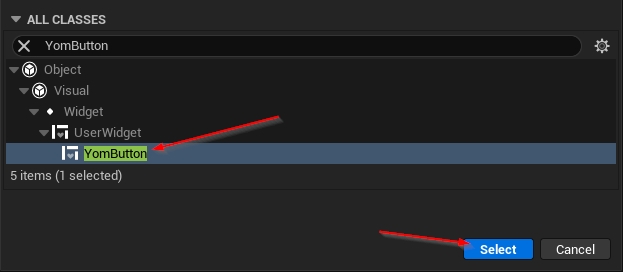
Content Browser and under Create Basic Asset click on Blueprint Class.This will open up the blueprint dialog box in which you can search for YomButton. Once you find the YomButton select it.
Name the button something like MyButton and open up the blueprint by double-clicking the new asset. In the blueprint editor, you will now have an empty screen, in which you will have to design your button. But before you start the button will need some widgets:
Canvas (Overlay)
The canvas in which the button can be built
Button (Button)
The button that can be clicked
RarityWidget (Any Widget)
The rarity widget, can be seen as the border around the button
LoadingWidget (Any Widget)
The widget that is shown when the item is being loaded
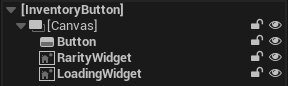
All of these widgets also need to have the name of the items described above. In the default YomButton the hierarchy looks like this:
Set the visibility of the RarityWidget to Not Hit-Testable (Self & All Children) by clicking on the RarityWidget in the hierarchy and going to Details -> Behavior -> Visibility. This prevents the Rarity widget from 'overlapping' the button which would prevent a user from pressing the button.
Design your button with a fixed size this will prevent the buttons from 'stretching' when loaded
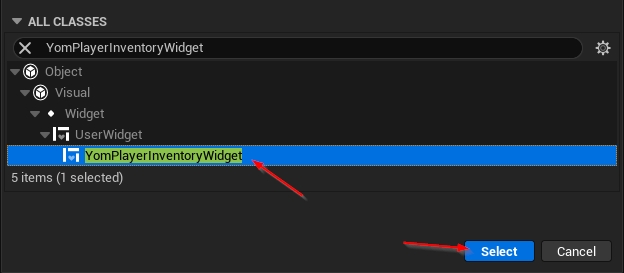
Create another blueprint like in step 1, but this should have YomPlayerInventoryWidget selected.
Give this a name as well like MyPlayerInventoryWidget and open up the blueprint by double clicking the new asset. This will again give you an empty screen. On this screen, you can design your layout of the inventory. It will need one widget:
BaseButtonWidget (A widget with slots for other widgets like the Scroll Box)
In this widget, your buttons will be created
The hierarchy of the default InventoryWidget looks like this:
Furthermore, your MyPlayerInventoryWidget needs to have some settings applied to it before it works. Click on MyPlayerInventoryWidget in the hierarchy and go to Details -> Yom Inventory. Here you will see the following settings:
Yom Button Widget
The widget for your button, set this to the button you created in step 1.
Base Button Widget
This one should be set to the BaseButtonWidget in the hierarchy, but if it is not set, you can set it here
Start Button Amount
This value tells the inventory system how many buttons it should spawn when the player is connected. If the player has more items than this amount more buttons will be loaded.
Keep in mind that players could have more items in their inventory than you expect. Your inventory should not deform when a lot of items are being loaded.
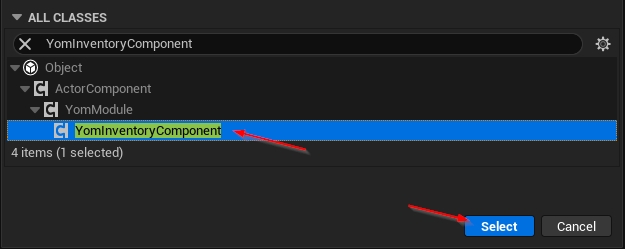
Create another blueprint like in step 1, but this should have YomInventoryComponent selected.
Give this a name as well like MyInventory and open up the blueprint by double clicking the new asset. In the asset, you will have to set one setting. Go to Details -> Yom Inventory Component -> Inventory Widget and set it to the widget you created in Step 2
Open your MetaspacePlayer and under components remove YomDefaultInventory if present. Then add the component that you created in step 3. When you start the game now you can see your own inventory in action when pressing 'I' while playing.
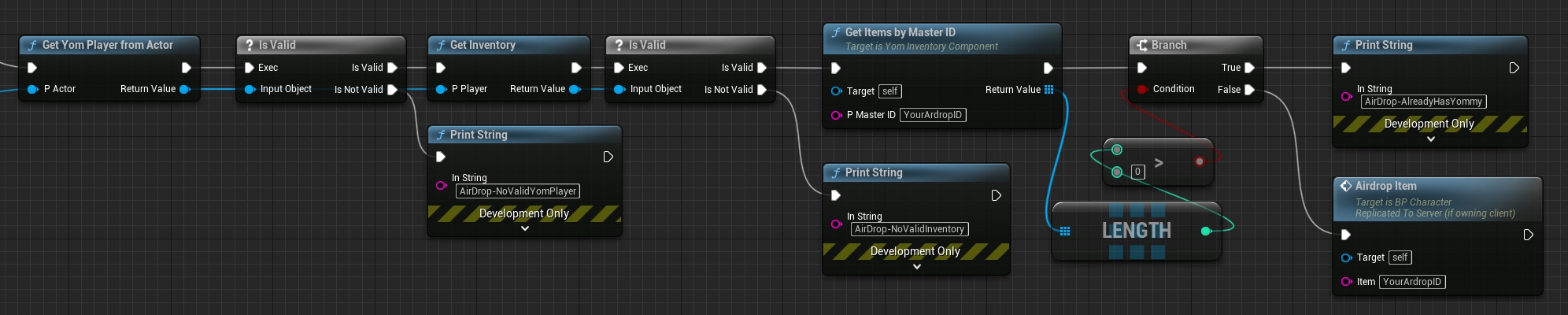
If you want to check if a user has already received an airdrop, you can follow these steps:
Retrieve the YomPlayer of the player.
Get the inventory of the YomPlayer.
Check if there is an item in the inventory with the ID of your master NFT ID. If an item with that ID exists, it means the user has already received the airdrop.
To check if a user has a wallet connected, follow these steps:
Get the player you want to check.
Retrieve the YomPlayer from that player.
Get the wallet of the YomPlayer.
Check if the wallet ID is empty. If it's not empty, it means the user has a wallet connected.
Fetching the wallet may take some time, so there is a callback function called "OnInventoryFetched" that you can use. To check if the wallet has been fetched, do the following:
Get the YomPlayer from the player.
Check if the YomPlayer has a valid inventory.
Bind an event to the "OnInventoryFetched" callback to be notified when the inventory is fetched.
Note: Airdrops last until the maximum supply of the item has been reached.

PLEASE READ THE ENTIRETY OF THIS "NOTICE AND DISCLAIMER" SECTION CAREFULLY. NOTHING HEREIN CONSTITUTES LEGAL, FINANCIAL, BUSINESS OR TAX ADVICE AND YOU SHOULD CONSULT YOUR OWN LEGAL, FINANCIAL, TAX OR OTHER PROFESSIONAL ADVISOR(S) BEFORE ENGAGING IN ANY ACTIVITY IN CONNECTION HEREWITH. NEITHER YOM B.V. (THE COMPANY), ANY OF THE PROJECT TEAM MEMBERS (THE YOM TEAM) WHO HAVE WORKED ON YOM (AS DEFINED HEREIN) OR PROJECT TO DEVELOP YOM IN ANY WAY WHATSOEVER, ANY DISTRIBUTOR/VENDOR OF $YOM TOKENS (THE DISTRIBUTOR), NOR ANY SERVICE PROVIDER SHALL BE LIABLE FOR ANY KIND OF DIRECT OR INDIRECT DAMAGE OR LOSS WHATSOEVER WHICH YOU MAY SUFFER IN CONNECTION WITH ACCESSING THE PAPER, DECK OR MATERIAL RELATING TO $YOM (THE TOKEN DOCUMENTATION) AVAILABLE ON THE WEBSITE AT WWW.YOM.NET (THE WEBSITE, INCLUDING ANY SUB-DOMAINS THEREON) OR ANY OTHER WEBSITES OR MATERIALS PUBLISHED BY THE COMPANY.
You agree that you are acquiring $YOM to participate in YOM and to obtain services on the ecosystem thereon. The Company, the Distributor and their respective affiliates would develop and contribute to the underlying source code for YOM. The Company is acting solely as an arms’ length third party in relation to the $YOM distribution, and not in the capacity as a financial advisor or fiduciary of any person with regard to the distribution of $YOM.
The Token Documentation is a conceptual paper that articulates some of the main design principles and ideas for the creation of a digital token to be known as $YOM. The Token Documentation and the Website are intended for general informational purposes only and do not constitute a prospectus, an offer document, an offer of securities, a solicitation for investment, any offer to sell any product, item, or asset (whether digital or otherwise), or any offer to engage in business with any external individual or entity provided in said documentation. The information herein may not be exhaustive and does not imply any element of, or solicit in any way, a contractual relationship. There is no assurance as to the accuracy or completeness of such information and no representation, warranty or undertaking is or purported to be provided as to the accuracy or completeness of such information. Where the Token Documentation or the Website includes information that has been obtained from third party sources, the Company, the Distributor, their respective affiliates and/or the YOM team have not independently verified the accuracy or completeness of such information. Further, you acknowledge that circumstances may change and that the Token Documentation or the Website may become outdated as a result; and neither the Company nor the Distributor is under any obligation to update or correct this document in connection therewith.
Nothing in the Token Documentation or the Website constitutes any offer by the Company, the Distributor, or the YOM team to sell any $YOM (as defined herein) nor shall it or any part of it nor the fact of its presentation form the basis of, or be relied upon in connection with, any contract or investment decision. Nothing contained in the Token Documentation or the Website is or may be relied upon as a promise, representation or undertaking as to the future performance of YOM. The agreement between the Distributor (or any third party) and you, in relation to any distribution or transfer of $YOM, is to be governed only by the separate terms and conditions of such agreement.
The information set out in the Token Documentation and the Website is for community discussion only and is not legally binding. No person is bound to enter into any contract or binding legal commitment in relation to the acquisition of $YOM, and no digital asset or other form of payment is to be accepted on the basis of the Token Documentation or the Website. The agreement for distribution of $YOM and/or continued holding of $YOM shall be governed by a separate set of Terms and Conditions or Token Distribution Agreement (as the case may be) setting out the terms of such distribution and/or continued holding of $YOM (the Terms and Conditions), which shall be separately provided to you or made available on the Website. The Terms and Conditions must be read together with the Token Documentation. In the event of any inconsistencies between the Terms and Conditions and the Token Documentation or the Website, the Terms and Conditions shall prevail.
By accessing the Token Documentation or the Website (or any part thereof), you shall be deemed to represent and warrant to the Company, the Distributor, their respective affiliates, and the YOM team as follows:
(a) in any decision to acquire any $YOM, you have not relied on and shall not rely on any statement set out in the Token Documentation or the Website;
(b) you will and shall at your own expense ensure compliance with all laws, regulatory requirements and restrictions applicable to you (as the case may be);
(c) you acknowledge, understand and agree that $YOM may have no value, there is no guarantee or representation of value or liquidity for $YOM, and $YOM is not an investment product nor is it intended for any speculative investment whatsoever;
(d) none of the Company, the Distributor, their respective affiliates, and/or the YOM team members shall be responsible for or liable for the value of $YOM, the transferability and/or liquidity of $YOM and/or the availability of any market for $YOM through third parties or otherwise; and
(e) you acknowledge, understand and agree that you are not eligible to participate in the distribution of $YOM if you are a citizen, national, resident (tax or otherwise), domiciliary and/or green card holder of a geographic area or country (i) where it is likely that the distribution of $YOM would be construed as the sale of a security (howsoever named), financial service or investment product and/or (ii) where participation in token distributions is prohibited by applicable law, decree, regulation, treaty, or administrative act (including without limitation the United States of America, Canada, and the People's Republic of China); and to this effect you agree to provide all such identity verification document when requested in order for the relevant checks to be carried out.
The Company, the Distributor and the YOM team do not and do not purport to make, and hereby disclaims, all representations, warranties or undertaking to any entity or person (including without limitation warranties as to the accuracy, completeness, timeliness, or reliability of the contents of the Token Documentation or the Website, or any other materials published by the Company or the Distributor). To the maximum extent permitted by law, the Company, the Distributor, their respective affiliates and service providers shall not be liable for any indirect, special, incidental, consequential or other losses of any kind, in tort, contract or otherwise (including, without limitation, any liability arising from default or negligence on the part of any of them, or any loss of revenue, income or profits, and loss of use or data) arising from the use of the Token Documentation or the Website, or any other materials published, or its contents (including without limitation any errors or omissions) or otherwise arising in connection with the same. Prospective acquirors of $YOM should carefully consider and evaluate all risks and uncertainties (including financial and legal risks and uncertainties) associated with the distribution of $YOM, the Company, the Distributor and the YOM team.
$YOM are designed to be utilised, and that is the goal of the $YOM distribution. In particular, it is highlighted that $YOM:
(a) does not have any tangible or physical manifestation, and does not have any intrinsic value (nor does any person make any representation or give any commitment as to its value);
(b) is non-refundable and cannot be exchanged for cash (or its equivalent value in any other digital asset) or any payment obligation by the Company, the Distributor or any of their respective affiliates;
(c) does not represent or confer on the token holder any right of any form with respect to the Company, the Distributor (or any of their respective affiliates), or its revenues or assets, including without limitation any right to receive future dividends, revenue, shares, ownership right or stake, share or security, any voting, distribution, redemption, liquidation, proprietary (including all forms of intellectual property or licence rights), right to receive accounts, financial statements or other financial data, the right to requisition or participate in shareholder meetings, the right to nominate a director, or other financial or legal rights or equivalent rights, or intellectual property rights or any other form of participation in or relating to YOM, the Company, the Distributor and/or their service providers;
(d) is not intended to represent any rights under a contract for differences or under any other contract the purpose or pretended purpose of which is to secure a profit or avoid a loss;
(e) is not intended to be a representation of money (including electronic money), security, commodity, bond, debt instrument, unit in a collective investment scheme or any other kind of financial instrument or investment;
(f) is not a loan to the Company, the Distributor or any of their respective affiliates, is not intended to represent a debt owed by the Company, the Distributor or any of their respective affiliates, and there is no expectation of profit; and
(g) does not provide the token holder with any ownership or other interest in the Company, the Distributor or any of their respective affiliates.
Notwithstanding the $YOM distribution, users have no economic or legal right over or beneficial interest in the assets of the Company, the Distributor, or any of their affiliates after the token distribution.
To the extent a secondary market or exchange for trading $YOM does develop, it would be run and operated wholly independently of the Company, the Distributor, the distribution of $YOM and YOM. Neither the Company nor the Distributor will create such secondary markets nor will either entity act as an exchange for $YOM.
The information set out herein is only conceptual, and describes the future development goals for YOM to be developed. In particular, the project roadmap in the Token Documentation is being shared in order to outline some of the plans of the YOM team, and is provided solely for INFORMATIONAL PURPOSES and does not constitute any binding commitment. Please do not rely on this information in deciding whether to participate in the token distribution because ultimately, the development, release, and timing of any products, features or functionality remains at the sole discretion of the Company, the Distributor or their respective affiliates, and is subject to change. Further, the Token Documentation or the Website may be amended or replaced from time to time. There are no obligations to update the Token Documentation or the Website, or to provide recipients with access to any information beyond what is provided herein.
No regulatory authority has examined or approved, whether formally or informally, any of the information set out in the Token Documentation or the Website. No such action or assurance has been or will be taken under the laws, regulatory requirements or rules of any jurisdiction. The publication, distribution or dissemination of the Token Documentation or the Website does not imply that the applicable laws, regulatory requirements or rules have been complied with.
All statements contained herein, statements made in press releases or in any place accessible by the public and oral statements that may be made by the Company, the Distributor and/or the YOM team, may constitute forward-looking statements (including statements regarding the intent, belief or current expectations with respect to market conditions, business strategy and plans, financial condition, specific provisions and risk management practices). You are cautioned not to place undue reliance on these forward-looking statements given that these statements involve known and unknown risks, uncertainties and other factors that may cause the actual future results to be materially different from that described by such forward-looking statements, and no independent third party has reviewed the reasonableness of any such statements or assumptions. These forward-looking statements are applicable only as of the date indicated in the Token Documentation, and the Company, the Distributor as well as the YOM team expressly disclaim any responsibility (whether express or implied) to release any revisions to these forward-looking statements to reflect events after such date.
The use of any company and/or platform names or trademarks herein (save for those which relate to the Company, the Distributor or their respective affiliates) does not imply any affiliation with, or endorsement by, any third party. References in the Token Documentation or the Website to specific companies and platforms are for illustrative purposes only.
The Token Documentation and the Website may be translated into a language other than English for reference purpose only and in the event of conflict or ambiguity between the English language version and translated versions of the Token Documentation or the Website, the English language versions shall prevail. You acknowledge that you have read and understood the English language version of the Token Documentation and the Website.
No part of the Token Documentation or the Website is to be copied, reproduced, distributed or disseminated in any way without the prior written consent of the Company or the Distributor. By attending any presentation on this Token Documentation or by accepting any hard or soft copy of the Token Documentation, you agree to be bound by the foregoing limitations.
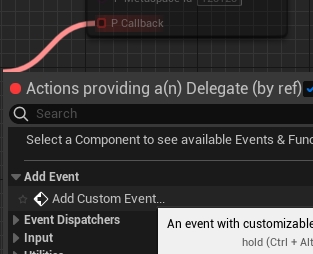
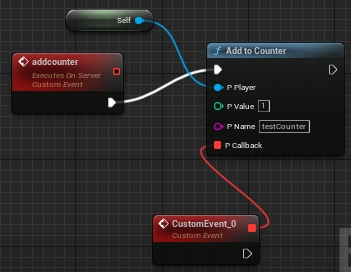
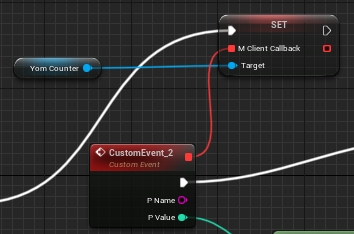
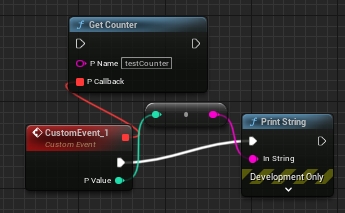
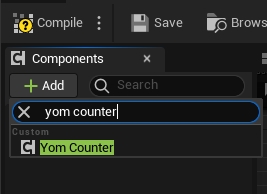
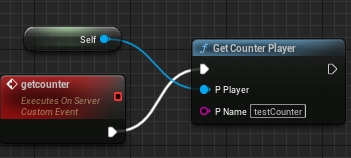


The UE5 section provides a comprehensive guide on how to properly set up and deliver your project to ensure you are getting the maximum out of YOM. The SDK contains solutions and templates specifically for quickly iterating game streams. A Checklist Before Starting (!):
If you are opting to use YOM within an existing Unreal Engine project, please check the Linux support for existing plugins. If your plugin does not officially support compile to Linux, in most cases it still compiles to Linux and if not on the first try, the fix is usually very simple.
Verify you have the right Clang version for cross-platform compiling. Install the cross-compile toolchain that you can find on the bottom of the page.
You need to install to build the headers for the SDK.
For multiplayer support you need to download and use the of Unreal Engine.
You need to use a C++ version of an UE5 project. This can be achieved by setting up a new project and selecting C++ as the project defaults or by converting your existing blueprint project to C++. There is no disadvantage for picking C++ over Blueprints as you can still use Blueprints throughout your project.
If you are converting from an existing project follow the following steps to convert it to a C++ project:
Click Tools -> select "new C++ class"
Select none as the parent class and press next.
Press create and it will convert your Blueprint project to a C++ project.
To incorporate the necessary SDK into your project, follow these steps:
Close your project if you opened it as part of the previous step.
Navigate to your root project folder and create a new folder called "Plugins". This folder will serve as the container for the required plugins.
Obtain the YOM UE5 SDK for your Unreal Engine version from the . If you don't have access, ask your YOM contact person. This will trigger a download of a ZIP file. The ZIP file will contain three plugins.
Extract the zip file and copy and paste the three plugins into the "Plugins" folder you need to create in your project directory. Ensure that the plugins are directly placed inside the "Plugins" folder and not within any additional subfolders.
By following the steps outlined above, you should now have a folder structure resembling the following:
Now that everything is set, boot your project and compile the plugin headers. This need to be done once every time you update the SDK or add any other plugin and requires using a C++ project with installed. After it is set, it will automatically open the project
Opening the project for the first time can take a bit of time. Just be patient. It will boot.
YOM SDK should be enabled by default. Validate by checking if a new toolbar appeared in your navigation bar called 'YOM Toolbar'.
Click on "Edit" and select "Plugins" from the dropdown menu. This will open the Plugins window.
In the search bar within the Plugins window, type 'YOM' to search for the YOM Replicator SDK plugin.
Enable it. If the plugin does not appear, try restarting the editor and repeat this step.
Do the same for GltfRuntime and VaRest plugins in the same manner and enable them by clicking their respective checkboxes.
To configure the YOM Replicator SDK for your metaverse project, follow these steps:
Open the setup screen by navigating to "Tools" in the top menu. Select "YOM" and then choose "Setup Project." This will open the setup window.
In the setup window, you will find several settings that need to be configured. Here is an explanation of each setting:
Startup World: This setting sets the startup level. When we make a build this will be the starting point. As example it can be a mainmenu or if you don't have that the scene the game begins
Game World: This setting sets the game level. This is the level where the game takes place.
Player Asset: This setting defines the asset that players will control within the world. It can be any character or object that allows player interaction. The default character provided by the YOM plugin is the Yom_BP_ThirdPersonCharacter. Change it from "None" to "Yom_BP_ThirdPersonCharacter".
Click "Begin Setup," and if the settings are correctly configured, a message will appear in the bottom right corner, instructing you to restart the editor. Click "Restart" to apply the changes.
In case you want to make any further adjustments or verify the setup, you can run the setup tool again or manually modify the settings.
To test your game locally you can do this in three ways:
Stream to localhost:8888. This allows you to debug the full web experience, including player authentication. This is the default setting with all toggled turned off and is also the recommended setting to playtest the full experience.
Play it in viewport. If you want to quickly debug locally and you want to bypass the authentication window, you can opt for testing in the viewport. To enable this you need to toggle on 'Run in Editor' and 'Auto Spawn Player'.
Play in standalone. If you want to debug networking features without needing to first pass the authentication window in the web browser, you need to toggle on 'Auto Spawn Player'.
For these things we made the YOM Toolbar to easily test your game. We added some settings to help you test your game:
Launch Game. Launches the game with the below settings.
Run in Editor. When turned off it runs the game in stand alone and starts the signaling server. When turned on it will run the game in viewport and not start the signaling server.
Respawn Player. When turned off it runs the game in stand alone and starts the signaling server. When turned on it will run the game in viewport and not start the signaling server.
The YOM Toolbar it to make it easy to test locally. You can still use the default buttons to play the game and the settings will apply to it.
Pressing the Launch Stream button, the servers and games will boot and you can debug your game within a webpage. Make sure to add a Player Start to the level if the character does not spawn automatically.
In Unreal Engine, go to the top bar: Tools → YOM → Package Project.
In the opened menu, select the paths to your client and server build folders.
If you used the recommended "Build" folder, paths should be automatically selected.
Click "Package Project" to create separate zip files for the client and server.
Inside "BuildData", you'll find two zip files, one for the client and one for the server, that are ready to upload to app.yom.net.
THIS PRIVACY POLICY WILL EXPLAIN HOW YOM USES THE PERSONAL INFORMATION WE COLLECT WHEN YOU USE OUR WEBSITE. AS USED HEREIN, PERSONAL DATA REFERS TO DATA THAT SPECIFICALLY OR INDIRECTLY IDENTIFIES OR IS REASONABLY CAPABLE OF IDENTIFYING AN INDIVIDUAL, AS WELL AS DATA THAT CAN BE LINKED TO A KNOWN OR REASONABLY IDENTIFIABLE INDIVIDUAL.
Information we collect includes both information you knowingly and actively provide us when using or participating in any of our services and promotions, and any information automatically sent by your devices in the course of accessing our products and services, as well as information we obtain through third party sources.
Directly from you, we can collect the following categories of Personal Data:
Personal information, such as a person’s first and last name, email address, username, password, phone number, and mailing address and any other information you directly provide to us on or through the services;
Transaction information, such as trading, order activity, deposits, withdrawals, and account balances and other commercial activity;
Communications, including details you give in correspondence, such as account registration, support requests and customer service;
Through your use of our services, we can automatically collect the following categories of Personal Data:
Internet identifiers like IP addresses and domain names;
Usage data, such as system operation, internal and external information related to sites that you visit;
Device information, such as hardware, operating system, and browser;
Data on geolocation;
Third-party sources can be used to obtain and/or validate the following types of Personal Data about you:
Personal information, such as a person’s name, email address, phone number, and mailing address;
Transaction information, such as public blockchain data;
Analytics information, provided by third party analytics services that we engage to help analyze how users use our services;
Additional information, at our discretion, to comply with legal obligations.
We collect Personal Data about you in order to give you the best possible experience, protect you from the risks of inappropriate use and fraud, and to help us retain and develop our Services. We can use your Personal Data in the following ways, in order to:
Provide and administer our services to you. In accordance with our Terms and Conditions, we use your Personal Data to provide you with our Services and comply with all relevant laws and regulations. Your Personal Data is processed in accordance with relevant laws and regulations.
Operate, maintain, improve, personalize, and analyze our services.
Facilitate the creation of your Account on YOM and its security (including possible multi-step verification).
YOM would like to periodically send you promotional information about products and services of ours that we think you might like.
If you have agreed to receive marketing communications, you may always opt out at a later date.
You have the right at any time to request YOM to stop contacting you for marketing purposes.
If you no longer wish to be contacted for marketing purposes, please contact [email protected].
YOM would like to make sure you are fully aware of all your data protection rights. Every user is entitled to the following:
The right to access – You have the right to request YOM for copies of your personal data.
The right to rectification – You have the right to request that YOM correct any information you believe is inaccurate. You also have the right to request YOM to complete the information you believe is incomplete.
The right to erasure – You have the right to request that YOM erase your personal data, under certain conditions.
If you make a request, we have one month to respond to you. If you would like to exercise any of these rights, please contact us at our email: [email protected]
Cookies are text files placed on your computer to collect standard Internet log information and visitor behavior information. When you visit our Website, we may collect information from you automatically through cookies or similar technology.
For further information, visit aboutcookies.org.
YOM uses cookies in a range of ways to improve your experience on our website, including:
Functionality. We use Cookies to ensure that the Website functions properly, including page loads, keeping you signed in and saving preferences.
Performance and Analytics. We use Cookies to gather usage and performance data. This enables us to understand how you use our website, and to monitor and improve YOM's performance, our services, and your experience, as well as to detect, prevent and address technical issues.
You can set your browser not to accept cookies, and the above website tells you how to remove cookies from your browser. However, in a few cases, some of our website features may not function as a result.
At our discretion, we may change our privacy policy to reflect updates to our business processes, current acceptable practices, or legislative or regulatory changes. If we decide to change this privacy policy, we will post the changes here at the same link by which you are accessing this Privacy Policy.
If required by law, we will get your permission or give you the opportunity to opt in to or opt-out of, as applicable, any new uses of your personal information.
If you have any questions about YOM's privacy policy, the data we hold on you (if any), or you would like to exercise one of your data protection rights, please do not hesitate to contact us.
Email us at: [email protected]
PLEASE READ THIS AGREEMENT CAREFULLY BEFORE ACCESSING OR USING THE WEBSITE (THE WEBSITE, INCLUDING ANY SUB-DOMAINS THEREON), INCLUDING, WITHOUT LIMITATION, THE CREATION, MINTING, LISTING, PURCHASE, SALE, EXCHANGE, OR MODIFICATION OF CERTAIN DIGITAL ASSETS (COLLECTIVELY, THE SERVICE). BY ACCESSING OR USING ANY PART OF THE WEBSITE, YOU AGREE TO BECOME BOUND BY THE TERMS AND CONDITIONS OF THIS AGREEMENT. IF YOU DO NOT AGREE TO ALL THE TERMS AND CONDITIONS OF THIS AGREEMENT, THEN YOU MAY NOT ACCESS THE WEBSITE, USE ANY SERVICES, OR BUY CRYPTO ASSETS. THE WEBSITE IS AVAILABLE ONLY TO INDIVIDUALS WHO ARE AT LEAST 18 YEARS OLD.
THE WEBSITE IS OFFERED SUBJECT TO YOUR ACCEPTANCE WITHOUT MODIFICATION OF ALL THE TERMS AND CONDITIONS CONTAINED HEREIN AND ALL OTHER OPERATING RULES, POLICIES AND PROCEDURES THAT MAY BE PUBLISHED FROM TIME TO TIME ON THE WEBSITE (TAKEN TOGETHER, THE AGREEMENT). YOM IS A PLATFORM. YOM IS NOT A BROKER, FINANCIAL INSTITUTION, OR CREDITOR. THE SERVICES OFFERED ON THE PLATFORM ARE OF ADMINISTRATIVE NATURE ONLY.
Cookies can be used to collect Personal Data automatically.
Inform you about other news about our services or any features and content thereon, including newsletters, surveys, offers, promotions, contest, and events via optional newsletters and emails, as described in the section below.
Detect, prevent or investigate security breaches, fraud and any other unauthorized or illegal activity. We use your Personal Data to identify and prevent account fraud, as well as other prohibited activities.
Ensure the protection and security of our facilities. To keep your account and YOM safe, we use your Personal Data, which includes information about your computer and your behavior on YOM.
Assist you with customer service, care and support. When you contact our support team with questions or concerns about your account, we process your Personal Data.
Promote our goods. We may contact you to provide you with information about our products and services. Only with your permission, which you may revoke at any time, will we do so.
Other commercial uses. If the intent is revealed to you before we collect the information or if you agree, we can use your Personal Data for additional purposes.
The right to object to processing – You have the right to object to YOM's processing of your personal data, under certain conditions.
The right to data portability – You have the right to request that YOM transfer the data that we have collected to another organization, or directly to you, under certain conditions.
YOM Privacy Policy explains the way we handle and protect your personal data in relation to your use and browsing of the Website. By agreeing to the present terms and conditions and to be able to use the Service, you also agree to our Privacy Policy.
In order to list and purchase crypto assets, you need to register for an account on the Service (“Account”). By creating an Account, you agree to:
a) provide accurate, current and complete Account information about yourself;
b) maintain and promptly update from time to time, as necessary, your Account information;
c) maintain the security of your password and accept all risks of unauthorized access to your Account and the information you provide to us; and
d) immediately notify us if you discover or otherwise suspect any security breaches related to the Service, or your Account.
YOM will block multiple accounts of the same user.
Also, you agree that you will not:
a) create another account if YOM disabled one you had, unless you have YOM's written permission first;
b) buy, sell, rent or lease access to your Account or username, unless you have YOM's written permission first;
c) share your Account password with anyone; or
d) log in or try to login to access the Service through unauthorized third party applications or clients.
YOM may require you to provide additional information and documents at the request of any competent authority or in case of application of any applicable law or regulation, including laws related to anti-laundering (legalization) of incomes obtained by criminal means, or for counteracting financing of terrorism. YOM may also require you to provide additional information and documents in cases where it has reasons to believe that:
a) your Account is being used for money laundering or for any other illegal activity;
b) you have concealed or reported false identification information and other details; or
c) transactions made via your Account were made in breach of these Terms.
In such cases, YOM , in its sole discretion, may pause or cancel your purchase transactions until such additional information and documents are reviewed by YOM and accepted as satisfying the requirements of applicable law. If you do not provide complete and accurate information and documents in response to such a request, YOM may refuse to provide the Service.
By registering an Account on YOM, you give us permission to use your name and picture for marketing and promotional purposes. Users registered as creators also understand and agree that YOM may display, reproduce, and distribute their works represented in digital assets minted, listed and tradable on YOM, for the purpose of operating, promoting, sharing, developing, marketing, and advertising the Website, or any other purpose related to YOM.
Within the limits of applicable law, YOM reserves the right to review and change this Agreement at any time. You are responsible for regularly reviewing these terms and conditions. Continued use and browsing of the Website after such changes shall constitute your consent to such changes.
By creating an Account, you consent to receive electronic communications from YOM (e.g. via email or by posting notices to the Service).
These communications may include notices about your Account (e.g. password changes and other transactional information) and are part of your relationship with YOM.
You agree that any notices, agreements, disclosures or other communications that YOM sends to you electronically shall satisfy any legal communication requirements, including, but not limited to, that such communications be in writing.
YOM may also send you promotional communications via email, including, but not limited to, newsletters, special offers, surveys and other news and information we think will be of interest to you. You may opt out of receiving these promotional emails at any time by following the unsubscribe instructions provided therein.
You acknowledge that the ownership of digital assets (NFTs) made available or purchased on the Website may give you the right to view, store, exchange, sell and display the NFT publicly but does not allow or imply commercial use or ownership of intellectual property on the brand, design, music, video, art or other media displayed in your digital asset NFTs, unless specifically stated otherwise.
Except as expressly provided to the contrary in writing by YOM, the Service and content contained therein, and crypto assets listed therein are provided on an “as is” and “as available” basis without warranties or conditions of any kind, either express or implied.
YOM makes no warranty that the Service:
a) will meet your requirements;
b) will be available on an uninterrupted and timely basis.
YOM disclaims all other warranties or conditions, express or implied, including, without limitation, implied warranties or conditions of merchantability, fitness for particular purpose, title and non-infringement to the Service, as well to the content published therein.
While YOM attempts to make your access to and use of the service and content safe, you accept the inherent security risks of providing information and dealing online over the internet and will not hold YOM responsible for any breach of security unless it is due to our gross negligence.
YOM shall not be responsible or liable to you for any loss and take no responsibility for, and shall not be liable to you for any use of crypto assets, including but not limited to any losses, damages or claims arising from:
a) user error, such as forgotten passwords, incorrectly contruced transactions, or mistyped addresses;
b) server failure or data loss;
c) corrupted wallet files;
d) unauthorized access to applications;
e) any unauthorized third party activities; including, without limitation, the use of viruses, phishing, brute forcing, or other means of attack against the service or crypto assets.
Crypto assets are intangible digital assets. They exist only by virtue of the ownership record maintained in a blockchain. Any transfer of title that might occur in any unique digital asset occurs on the decentralized ledger within the blockchain. YOM does not guarantee that YOM can effect the transfer of title or right in any crypto assets.
However, YOM requests its users who register as creators to warrant that the crypto assets they mint as NFTs and list through YOM are their own individual creations, which have not previously been published and/or exploited in any manner, in order for them to comply with these Terms, under liability to YOM and other users.
YOM is not responsible for sustained casualties due to vulnerability or any kind of failure, abnormal behavior of software (e.g., wallet, smart contract), blockchains or any other features of crypto assets. YOM is not responsible for casualties due to late report by developers or representatives (or no report at all) of any issues with the blockchain supporting crypto assets including forks, technical node issues or any other issues having fund losses as a result.
Nothing in these Terms shall exclude or limit liability of either party for fraud, death or bodily injury caused by negligence, violation of laws, or any other activity that cannot be limited or excluded by legitimate means.
Some jurisdictions do not allow the exclusion of implied warranties in contracts with consumers, so the above exclusion may not apply to you.
You accept and acknowledge:
a) The prices of blockchain assets are extremely volatile. Fluctuations in the price of other digital assets could materially and adversely affect the crypto assets, which may also be subject to significant price volatility. We cannot guarantee that any purchasers of crypto assets will not lose money.
b) You are solely responsible for determining what, if any, taxes apply to your crypto assets transactions. YOM is not responsible for determining the taxes that apply to crypto assets transactions.
c) There are risks associated with using an Internet based currency, including but not limited to, the risk of hardware, software and Internet connections, the risk of malicious software introduction, and the risk that third parties may obtain unauthorized access to information stored within your wallet. You accept and acknowledge that YOM shall not be responsible for any communication failures, disruptions, errors, distortions or delays you may experience when using the crypto assets, however caused.
d) A lack of use or public interest in the creation and development of distributed ecosystems could negatively impact the development of those ecosystems and related applications, and could therefore also negatively impact the potential utility or value of crypto assets.
e) The regulatory regime governing blockchain technologies, cryptocurrencies, and tokens is uncertain, and new regulations or policies may materially adversely affect the development of the Service and the utility of crypto assets.
f) There are risks associated with purchasing user generated content, including but not limited to, the risk of purchasing counterfeit assets, mislabeled assets, assets that are vulnerable to metadata decay, assets on smart contracts with bugs, and assets that may become untransferable. YOM reserves the right to hide collections, contracts, and assets affected by any of these issues or by other issues. Assets you purchase may become inaccessible on YOM. Under no circumstances shall the inability to view your assets on YOM serve as grounds for a claim against YOM.
To the fullest extent permitted by law, in no event shall YOM be liable to you or any third party for any lost profit or any indirect, consequential, exemplary, incidental, special or punitive damages arising from these terms, the Service, or for any damages related to loss of revenue, loss of profit, loss of business or anticipated savings, loss of use, loss of goodwill, or loss of data, and whether caused by tort (including negligence), breach of contract, or otherwise.
The access to and use of the Services are at your own discretion and risk, and you shall be solely responsible for any damage to your computer system or mobile device or loss of data resulting therefrom.
Notwithstanding anything to the contrary contained herein, in no event shall the maximum aggregate liability of YOM arising out of or in any way related to these terms, the access to and use of the service, content, crypto assets, or any products or services purchased on the service exceed the greater of:
a) the amount received by YOM from the sale of crypto assets that are the subject of the claim, and
b) the operational costs from the sale of crypto assets that are the subject of the claim.
The foregoing limitations of liability shall not apply to liability of YOM for:
a) death or personal injury caused by a member of YOM's negligence; or for
b) any injury caused by a member of YOM's fraud or fraudulent misrepresentation.
Some jurisdictions do not allow the exclusion or limitation of incidental or consequential damages, so the above limitation or exclusion may not apply to you. Some jurisdictions also limit disclaimers or limitations of liability for personal injury from consumer products, so this limitation may not apply to personal injury claims.
Notwithstanding anything contained in these Terms, we reserve the right, without notice and in our sole discretion, to terminate your right to access or use the Service at any time and for any or no reason, and you acknowledge and agree that we shall have no liability or obligation to you in such event and that you will not be entitled to a refund of any amounts that you have already paid to us, to the fullest extent permitted by applicable law.
If any term, clause or provision of these Terms is held invalid or unenforceable, then that term, clause or provision shall be severable from these Terms and will not affect the validity or enforceability of any remaining part of that term, clause or provision, or any other term, clause or provision of these Terms.
This Agreement shall be governed in all respects by the substantive laws of the Netherlands. Any controversy, claim, or dispute arising out of or relating to the Agreement shall be subject to the jurisdiction of the competent courts of the Netherlands, the jurisdiction of the Dutch Court being expressly reserved.
After enabling the plugins, it is recommended to restart the editor. This allows Unreal to load the plugins properly.
GameMode asset: The GameMode that is used the game world or you want to use in the game world.
Webserver path: The path to the webserver you want to use. We already profite a example webserver.
Multiplayer project: If enabled, this setting allows the code from the SDK to be multiplayer. Enable this if you creating a game for multiplayer
Voice Chat: If enabled, this setting allows players to communicate with each other through voice chat within the experience.
Run Webserver: When turned on it will start the webserver when we press launch game
Run Webclient: When turned on it will start the webclient when we press launch game
Force Authentication. When true, if forces users to authenticate with their wallet else it will not work.
Number of Clients. You can select the number of clients it needs to boot up. It will also boot up another signalling server. You can connect to it by adding a port. 8888 is the first one second 8889 etc.
After the process completes, find a new folder called "BuildData" in your project directory.


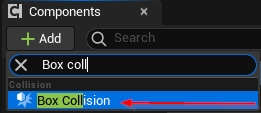
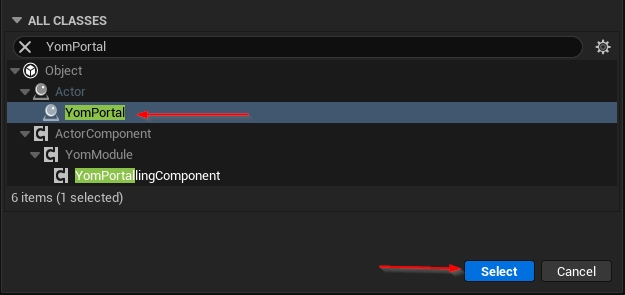
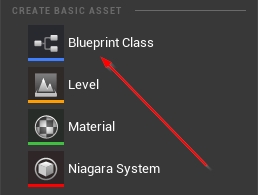

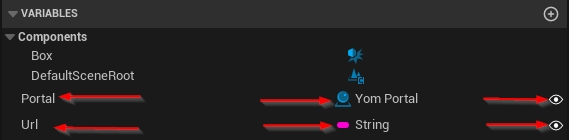
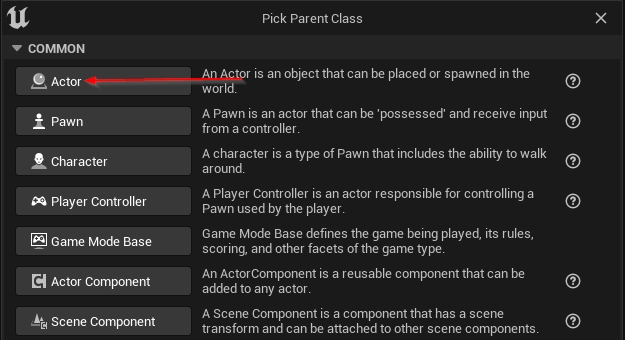
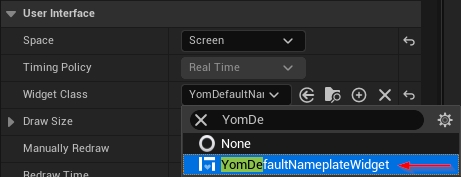
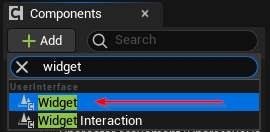
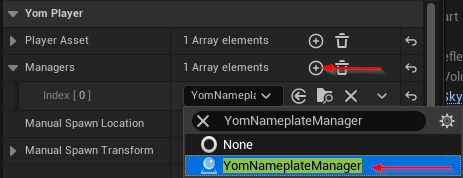
YOM is a decentralized cloud gaming infrastructure (DePIN) that allows users to stream immersive gaming experiences to any device without the need for expensive hardware. YOM connects idle GPU resources from self-hosted and delegated nodes to studios, brands, and broadcasters, offering scalable, cost-efficient cloud gaming solutions.
YOM utilizes a decentralized network of gaming machines (nodes) running our custom Node OS, which stream gaming sessions to end users. Studios and brands pay for these services, and node operators earn rewards in $YOM tokens for providing computing resources.
Node Operators: Earn passive income by contributing GPU resources to the network.
Community Members: Participate in governance, earn XP rewards, and engage with the ecosystem.
Studios & Brands: Leverage YOM to provide immersive, high-quality experiences to their audiences at a fraction of traditional cloud gaming costs.
You can start by choosing one of two options:
Delegation (Hands-off approach):
Purchase a node license for $199 and delegate it to a Node-as-a-Service (NaaS) provider.
Self-Hosting (Hands-on approach):
Purchase a plug-and-play device
GPU: Any NVIDIA RTX config (2060RTX and higher) with high VRAM to maximize node capacity.
CPU: Intel i7/i9 or AMD Ryzen 7/9 for better multitasking and stability.
RAM: 16GB would be sufficient on low config setups, but 32GB+ is recommended.
Storage: No storage needed for plug n play solution. For custom Linux boot deployment: 1TB+ available space needed.
Earnings depend on workload demand and regional factors. On average:
Lower Bound (-1 SD): $32 per node/month
Average: $77 per node/month
Upper Bound (+1 SD): $121 per node/month
Earnings assume 50% workload utilization across different demand periods.
Delegation: Fully managed by a NaaS provider, with minimal effort required. Lower technical involvement but lower optimization potential.
Self-Hosting: Provides full control over operations and the potential for higher earnings with greater responsibility for setup and maintenance.
Costs include:
Hardware acquisition: New rigs vs. using existing setups.
Electricity costs: Managing power efficiency for profitability.
Scaling costs: Adding more node licenses to increase earnings.
YOM offers:
Cost Efficiency: Reduce cloud gaming costs from $6/hour to $0.30/hour.
Scalability: Access a global network of nodes without infrastructure investment.
Ease of Integration: Embed streams directly into websites, apps, and platforms with a single line of code.
Customization: Implement branding, analytics, and monetization strategies easily.
YOM uses an AI-powered Resource Orchestrator that dynamically selects the best nodes based on:
Latency: Ensuring the lowest possible ping.
Node Reputation: Prioritizing high-performing nodes with good uptime.
Game Availability: Allocating nodes with pre-loaded game assets for faster deployment.
YOM follows a session-based pricing model, where studios pay:
$0.05 per gaming session (based on an average 10-minute session).
$89/month base fee for access to analytics and dashboard services.
The YOM ecosystem integrates advertising seamlessly into gaming sessions. Studios benefit by:
Leveraging pre-session ads that align with their goals.
Receiving a revenue share from ad impressions during gameplay.
Reducing costs via ad-supported models while maintaining player engagement.
$YOM is the native utility token of the YOM ecosystem, used for:
Paying for cloud gaming services.
Rewarding node operators for their contribution.
Staking to earn additional rewards.
Ensuring network security and sustainability through a deflationary model (5% burn on usage).
XP is a soul-bound value that represents user contributions and engagement in the ecosystem. It is used to:
Boost leaderboard rankings for better workload allocation.
Participate in governance decisions via the YOM DAO.
Gain eligibility for additional $YOM drops and rewards.
YOM follows a deflationary model, meaning no new tokens are minted, and a portion of each transaction is burned, reducing supply over time. This ensures value retention for stakeholders.
Increase earnings by:
Maintaining high uptime and reliability for better workload allocation.
Participating in the Streak Program, which provides bonus rewards for consistent online presence.
Accumulating XP to boost node rankings and priority.
YOM operates under a DAO model, allowing the community to influence key decisions, such as:
Platform policies and content guidelines.
Allocation of treasury funds to support network growth.
Voting on feature updates and ecosystem improvements.
Moderators: Manage community engagement and uphold policies.
Commissioners: Oversee quality assurance and approve projects.
Cardinals: Propose policies and contribute to strategic planning.
You can engage with YOM through:
Joining discussions in Discord and Telegram.
Contributing to development and governance through XP-based voting.
Running community events to onboard new users and expand the ecosystem.
Ensure your wallet is properly connected.
Verify your internet connection and reboot the system.
Contact YOM support if the issue persists.
Ensure proper cooling and power efficiency.
Use high-speed wired internet connections.
Regularly monitor performance metrics through the dashboard.
The YOM SDK allows creators to display a UI widget that would allow the player to understand the basic game controls. This guide will explain how to display and customize your own Control Hints with our ecosystem.
To use the features of the Control Hints component, it needs to be connected to your player. This should be done by default. However, if you do not see YomControlHints under your player as a component, follow this step. Otherwise, you can skip to step 2.
YomControlHints is a component therefore we need to add it to the player blueprint. To add the component you will have to click add on component menu and search for Yom Control Hints.
After this, you need to assign a widget to the YomControlHints component. By default an existing widget should be already available, otherwise you would have to create a one from scratch (step 2).
- YourProject
  - Plugins
    - YOM
- VaRestInternet: Wired Ethernet connection (min 25mbps upload).